개인적으로 제작 중인 프로젝트에 적용시키면서 실전경험 쌓기 (2024.04.01)
https://github.com/GyuminGomin/people-driver
GitHub - GyuminGomin/people-driver: busan IT Academy Final Project
busan IT Academy Final Project. Contribute to GyuminGomin/people-driver development by creating an account on GitHub.
github.com
동기 : 스프링 프레임워크에서 jwt토큰과 Spring Security를 적용하려고 하니 참고 자료가 많은 부트가 더 좋을 것 같고, 현재 공부하고 있는 내용들이 다 부트였기 때문에 부트로 전환하기로 마음먹게 되었다. 성공적으로 부트로 전환이 완료된 후 이 전환 과정을 기록 남기려고 한다.
기존 프레임워크 프로젝트는
프레임워크 5.3.31 (변경 o)
빌드도구는 Apache Maven (그대로)
자바는 jdk-11 (그대로)
로깅 도구는 slf4j (삭제 o)
mybatis는 mybatis-spring 3.5.15 (변경 x)
jpa는 spring-data-jpa 2.7.18 (변경 o)
을 사용하고 있다.
전체적인 구조가 너무 길어서 생략하고 (필수적으로 알아야하는 것들만 작성)
자세히 알고 싶으면 제 깃 홈페이지에 framework와 main 브런치의 pom.xml 차이를 보시면 됩니다.
1. pom.xml에 부트로 전환시 필요한 라이브러리 구별 (변경 o)
| Spring Framework | Spring Boot | |
| 세부사항 | GroupId / ArtifactId / Version | GroupId / ArtifactId / Version |
| 구분 | org.springframework / spring-context / 5.3.31 | org.springframework.boot / spring-boot-starter / 2.7.18 |
| 웹 | org.springframework / spring-webmvc / 5.3.31 | org.springframework.boot / spring-boot-starter-web / 2.7.18 |
| Test | org.springframework / spring-test / 5.3.31 | org.springframework.boot / spring-boot-starter-test / 2.7.18 |
| spring-jdbc | org.springframework / spring-jdbc / 5.3.31 | org.springframework.boot / spring-boot-starter-jdbc / 2.7.18 |
| jpa | org.springframework.data / spring-data-jpa / 2.7.18 | org.springframework..boot / spring-boot-starter-data-jpa / 2.7.18 |
기본적으로 구조를 바꾸는건 java 버전에 맞춘 현재 나온 최신 버전을 기준으로 바꿔 주면 된다.
2. pom.xml에 추가하거나 삭제
- Logger (삭제)
- 로깅 도구(Logger)를 스프링 부트에서 기본적으로 관리해 주는 로그백(Logback)을 사용하기 위해 기존에 설정되어 있던 로그 관련 항목들을 다 지웠다. (기본적으로 spring-boot-starter-web 의존성을 추가하면 로깅 도구를 추가할 필요가 없다.)
<!-- Logging -->
<dependency>
    <groupId>org.slf4j</groupId>
    <artifactId>slf4j-api</artifactId>
    <version>${org.slf4j-version}</version>
</dependency>
<dependency>
    <groupId>org.slf4j</groupId>
    <artifactId>jcl-over-slf4j</artifactId>
    <version>${org.slf4j-version}</version>
    <scope>runtime</scope>
</dependency>
<dependency>
    <groupId>org.slf4j</groupId>
    <artifactId>slf4j-log4j12</artifactId>
    <version>${org.slf4j-version}</version>
    <scope>runtime</scope>
</dependency>
<dependency>
    <groupId>log4j</groupId>
    <artifactId>log4j</artifactId>
    <version>1.2.15</version>
    <exclusions>
        <exclusion>
            <groupId>javax.mail</groupId>
            <artifactId>mail</artifactId>
        </exclusion>
        <exclusion>
            <groupId>javax.jms</groupId>
            <artifactId>jms</artifactId>
        </exclusion>
        <exclusion>
            <groupId>com.sun.jdmk</groupId>
            <artifactId>jmxtools</artifactId>
        </exclusion>
        <exclusion>
            <groupId>com.sun.jmx</groupId>
            <artifactId>jmxri</artifactId>
        </exclusion>
    </exclusions>
    <scope>runtime</scope>
</dependency>
- Spring Context (삭제)
- 기존 spring context 관련 설정은 (즉, 컨테이너와 빈관리는) spring-boot-starter에서 구현해 놓았기 때문에 의존성 중복 문제가 발생할 수 있어서 삭제 (사실 의존성 중복 문제는 테스트 해보지 않았지만, 있어도 에러가 없다고 합니다.)
<dependency>
    <groupId>org.springframework</groupId>
    <artifactId>spring-context</artifactId>
    <version>${org.springframework-version}</version>
    <exclusions>
        <!-- Exclude Commons Logging in favor of SLF4j -->
        <exclusion>
            <groupId>commons-logging</groupId>
            <artifactId>commons-logging</artifactId>
         </exclusion>
    </exclusions>
</dependency>
- JSP (추가)
- 기본적으로 부트는 Embeded JSP 엔진을 지원해주지 않는다. 따라서 JSP를 사용하려면 tomcat-embed-jasper를 추가해야 한다. JSP를 Java Servlet으로 변환해 실행해주는 패키지이다. (spring-boot 2버전대는 9버전대를 쓸 수 있다.)
<dependency>
    <groupId>org.apache.tomcat.embed</groupId>
    <artifactId>tomcat-embed-jasper</artifactId>
    <version>9.0.83</version>
    <scope>provided</scope>
</dependency>
- 부트 plugin (추가)
- 기본적으로 부트는 Embeded Tomcat 서버를 사용하기 때문 애플리케이션 실행, 패키징, 리소스 관리, 프로파일 활성화 등을 위해 플러그인을 추가로 넣는다.
<plugin>
    <groupId>org.springframework.boot</groupId>
    <artifactId>spring-boot-maven-plugin</artifactId>
    <version>${org.springframework-boot-version}</version>
</plugin>
여기까지 설정하면 기본적인 pom.xml 설정은 다 끝났다. 저는 java 버전을 그대로 사용하고 maven 빌드도구를 그대로 사용할 것이기에 별로 수정할 것이 많이 없었지만, 만약 java 버전을 바꾼다거나 maven을 gradle로 바꾸게 된다면 많은 수정이 필요할 수 도 있다. (이런 경우, 꼭 mavenrepository에서 컴파일 의존성들을 꼭 잘 살펴보길 바랍니다.)
3. 전체적인 구조 변경
이제 설정은 어느정도 했으니, 프로젝트 구조를 바꿔야할 차례이다.
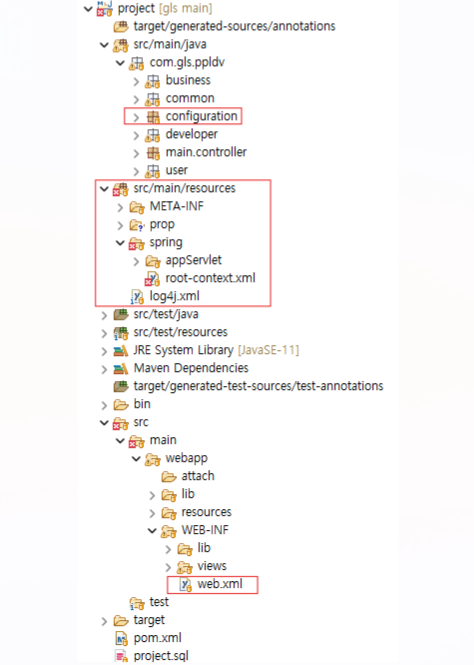
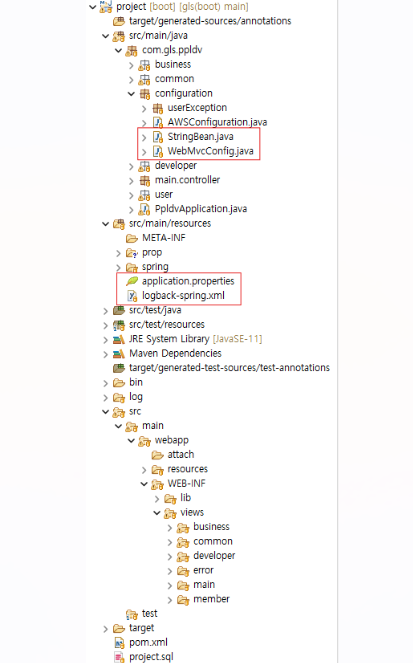
기존 프레임워크 구조(좌) 와 변경된 부트 구조(우)
- Logger 설정
- 먼저 로그 관련 설정을 변경 해 주기 위해 로그 기록을 자동으로 찍어서 Classpath에 로그 기록을 남기기 위해 다른 로그 블로그를 참고 했다.
- 기본적으로 spring-boot-starter-web에서 spring-boot-starter-logging을 구현해 놓았기 때문에 따로 application.properties에 설정을 할 필요 없이 log4j.xml을 제거하고 logback-spring.xml을 생성하면 된다.
https://velog.io/@wooryung/Spring-Boot-로그-설정하기-Logback
[Spring Boot] 로그 설정하기 - Logback
Logback자바 오픈소스 로깅 프레임워크, SLF4J의 구현체스프링 부트의 기본으로 설정되어 있어서 사용시 별도로 라이브러리를 추가하지 않아도 된다.log4j, log4j2 등과 성능을 비교했을 때에도 logback
velog.io
<?xml version="1.0" encoding="UTF-8"?>

<!-- 60초마다 설정 파일의 변경을 확인 하여 변경시 갱신 -->
<configuration scan="true" scanPeriod="60 seconds">
    <!-- 로그 파일이 저장될 경로 -->
    <property name="LOG_PATH" value="log"/>
    <!-- 로그 파일 이름 -->
    <property name="LOG_FILE_NAME" value="logging"/>
    <!-- 로그 출력 패턴 -->
    <property name="LOG_PATTERN" value="%d{yyyy-MM-dd HH:mm:ss.SSS} %-5level [%thread] [%logger{40}] - %msg%n"/>
    <!-- 로그 레벨 -->
    <!--
    	1) ERROR : 오류 메시지 표시
        2) WARN  : 경고성 메시지 표시
        3) INFO  : 정보성 메시지 표시
        4) DEBUG : 디버깅하기 위한 메시지 표시
        5) TRACE : Debug보다 훨씬 상세한 메시지 표시
        아래에서는 info로 설정하였는데, 이 경우엔 INFO보다 위에 있는 DEBUG와 TRACE는 표시하지 않는다.
    -->
    <property name="LOG_LEVEL" value="info"/> <!-- 이 부분을 바꾸면서 info, debug로 개발 진행 하면 됨 -->

    <!-- CONSOLE에 로그 출력 세팅 -->
    <appender name="CONSOLE" class="ch.qos.logback.core.ConsoleAppender">
        <encoder class="ch.qos.logback.classic.encoder.PatternLayoutEncoder">
            <Pattern>${LOG_PATTERN}</Pattern>
        </encoder>
    </appender>

    <!-- File에 로그 출력 세팅 -->
    <appender name="FILE" class="ch.qos.logback.core.rolling.RollingFileAppender">
        <!-- 파일 경로 설정 -->
        <file>${LOG_PATH}/${LOG_FILE_NAME}.log</file>
        <!-- 출력패턴 설정-->
        <encoder class="ch.qos.logback.classic.encoder.PatternLayoutEncoder">
            <pattern>${LOG_PATTERN}</pattern>
        </encoder>
        <!-- Rolling 정책 -->
        <rollingPolicy class="ch.qos.logback.core.rolling.TimeBasedRollingPolicy">
            <!-- .gz,.zip 등을 넣으면 자동 일자별 로그파일 압축 -->
            <fileNamePattern>${LOG_PATH}/%d{yyyy-MM, aux}/${LOG_FILE_NAME}.%d{yyyy-MM-dd}.log</fileNamePattern>
            <!-- 일자별 로그파일 최대 보관주기(~일), 해당 설정일 이상된 파일은 자동으로 제거-->
            <!-- <maxHistory>30</maxHistory> -->
            <!-- 로그 파일 최대 보관 크기. 최대 크기를 초과하면 가장 오래된 로그 자동 제거 -->
            <totalSizeCap>5GB</totalSizeCap>
        </rollingPolicy>
    </appender>

    <!-- 로그 전역 세팅 -->
    <root level="${LOG_LEVEL}">
        <!-- 위에 설정한 콘솔 설정 추가 -->
        <appender-ref ref="CONSOLE"/>
        <!-- 위에 설정한 파일 설정 추가 -->
        <appender-ref ref="FILE"/>
    </root>
</configuration>
- Context 설정 비교해 가며 application.properties 또는 Java 설정 파일 추가
- 기존 프레임워크인 Servlet 기반 웹 애플리케이션은 web.xml(배포서술자)를 사용하여 설정을 관리하는데, 부트에서는 web.xml을 사용하지 않고 자바 설정 파일을 사용해 설정을 관리한다.
- 이유
- web.xml 대신 자바 설정 파일을 사용하면, 간결하고 쉽게 알 수 있는 일목요연한 설정을 구성할 수 있다.
- 모듈화된 구성을 통해 여러 개의 설정 파일을 나눠 필요한 곳에 설정을 적용할 수 있다.
- 즉 개발자에게 편리하고 유연한 개발 환경을 제공하며, 코드 기반의 구성을 통해 높은 유지보수성과 확장성을 제공한다.
- 이유
- 따라서 먼저 root-context.xml 설정을 비교하면서 적용시켜 보았다.
<?xml version="1.0" encoding="UTF-8"?>
<beans xmlns="http://www.springframework.org/schema/beans"
	xmlns:xsi="http://www.w3.org/2001/XMLSchema-instance"
	xmlns:context="http://www.springframework.org/schema/context"
	xmlns:mybatis-spring="http://mybatis.org/schema/mybatis-spring"
	xmlns:jpa="http://www.springframework.org/schema/data/jpa"
	xmlns:tx="http://www.springframework.org/schema/tx"
	xsi:schemaLocation="http://mybatis.org/schema/mybatis-spring http://mybatis.org/schema/mybatis-spring-1.2.xsd
		http://www.springframework.org/schema/beans https://www.springframework.org/schema/beans/spring-beans.xsd
		http://www.springframework.org/schema/context http://www.springframework.org/schema/context/spring-context-4.3.xsd
		http://www.springframework.org/schema/data/jpa http://www.springframework.org/schema/data/jpa/spring-jpa-1.11.xsd
		http://www.springframework.org/schema/tx http://www.springframework.org/schema/tx/spring-tx-4.3.xsd">

	<!-- properties 파일에 등록되면 키를 통해 값을 불러올 수 있게 해주는 것 -->
	<context:property-placeholder location="classpath:prop/*.properties" />

	<!-- hikari cp 를 사용하기 위한 설정 정보를 저장하는 객체 -->
	<bean id="hikariConfig" class="com.zaxxer.hikari.HikariConfig">
		<property name="driverClassName" value="${jdbc.driver}" />
		<property name="jdbcUrl" value="${jdbc.url}" />
		<property name="username" value="${jdbc.username}" />
		<property name="password" value="${jdbc.password}" />
		<!-- 최대로 생성 할 수 있는 connection 객체 수 default = 10 -->
	<property name="maximumPoolSize" value="20" />
	<!-- 일을 하지 않아도 풀에 유지되는 connection 객체 수 default = maximumPoolSize -->
	<property name="minimumIdle" value="20" />
	<!-- pool에서 connection 정보를 가져오기 위해 대기하는 시간 default="250ms" -->
	<property name="connectionTimeout" value="300000" />
	<!-- 일을 하지 않는 connection 객체를 제거하기 위해 대기(유지)하는 시간 default="60000ms" -->
		<property name="idleTimeout" value="200000" />
	</bean>

	<bean id="ds" class="com.zaxxer.hikari.HikariDataSource">
		<constructor-arg ref="hikariConfig" />
	</bean>

	<!-- Mybatis sqlSession Factory -->
	<bean class="org.mybatis.spring.SqlSessionFactoryBean">
		<property name="dataSource" ref="ds" />
	</bean>

	<mybatis-spring:scan base-package="com.gls.ppldv.*.mapper" />

	<!-- jpa entityManagerFactory -->
	<bean id="entityManagerFactory" class="org.springframework.orm.jpa.LocalContainerEntityManagerFactoryBean">
	     <property name="dataSource" ref="ds" />
	     <!-- JpaVendorAdapter implementation for Hibernate EntityManager.
	        Exposes Hibernate's persistence provider and EntityManager extension interface -->
	   <property name="jpaVendorAdapter">
	      <bean class="org.springframework.orm.jpa.vendor.HibernateJpaVendorAdapter" />
	   </property>
	</bean>

	<jpa:repositories base-package="com.gls.ppldv.*.repository" />

	<!-- jpa, mybatis Transaction Manager -->
	<bean id="transactionManager" class="org.springframework.orm.jpa.JpaTransactionManager">
		<property name="entityManagerFactory" ref="entityManagerFactory" />
	</bean>

	<!-- transaction annotation -->
	<tx:annotation-driven/>

	<!-- multipart 파일 -->
	<bean id="multipartResolver" class="org.springframework.web.multipart.support.StandardServletMultipartResolver" />

	<bean id="uploadPath" class="java.lang.String">
		<constructor-arg value="${upload.file}"/>
	</bean>
</beans>- 크게 코드를 살펴보면, hikariCP, MyBatis, JPA, Transaction, MultipartFile 설정등이 들어가 있다.
- 이 설정들을 보면 되게 많지만, 부트에선 모든 것을 자동으로 다 제공해주고 있다.
<pre id="code_1637046272622" class="properties" data-ke-language="properties" data-ke-type="codeblock"><code>

# hikariCP 설정
spring.datasource.driver-class-name=${jdbc.driver}
spring.datasource.url=${jdbc.url}
spring.datasource.username=${jdbc.username}
spring.datasource.password=${jdbc.password}
spring.datasource.hikari.maximum-pool-size=20
spring.datasource.hikari.minimum-idle=20
spring.datasource.hikari.connection-timeout=300000
spring.datasource.hikari.idle-timeout=200000

# hikariCP를 사용하기 위해 spring.datasource.hikari.driver-class-name과
# spring.datasource.hikari.jdbc-url을 사용해 보았는데, url과 class-name을 찾을 수 없다는 에러가 떴었다.
# hikariCP 풀 사이즈나 대기 시간 등등 커넥션 풀 설정할때만 hikari를 사용해야 한다.

# 기존 hibernate 설정을 담당한 META-INF 파일 아래에 있던 persistence.xml 제거 후 설정
spring.jpa.show-sql=true
spring.jpa.hibernate.ddl-auto=create

# multipartFile 설정 (사용 여부)
spring.servlet.multipart.enabled=true
spring.servlet.multipart.max-file-size=20MB
spring.servlet.multipart.max-request-size=40MB
spring.servlet.multipart.file-size-threshold=20MB

# 기본적으로 dataSource 관련된 처리는 (트랜잭션) 부트가 자동으로 다 관리해 줘서 설정 필요 x
</code></pre>- 살펴보면, Mybatis의 경로 지정과 Jpa의 경로를 따로 지정해주지 않았는데, JPA는 @Repository 어노테이션이 등록되어 있으면 자동으로 매핑을 해 빈 등록을 해준다. 그리고 Mybatis는 Application.java 실행 파일에서 @MapperScan을 추가해주면 된다.
package com.gls.ppldv;

import org.mybatis.spring.annotation.MapperScan;
import org.springframework.boot.SpringApplication;
import org.springframework.boot.autoconfigure.SpringBootApplication;
import org.springframework.context.annotation.PropertySource;

@SpringBootApplication
@MapperScan("com.gls.ppldv.*.mapper")
public class PpldvApplication {

	public static void main(String[] args) {
		SpringApplication.run(PpldvApplication.class, args);
	}

}
- 배포서술자 설정 비교해 가며 application.properties 또는 Java 설정 파일 추가
- 기존 프레임워크인 Servlet 기반 웹 애플리케이션은 web.xml(배포서술자)를 사용하여 설정을 관리하는데, 부트에서는 web.xml을 사용하지 않고 자바 설정 파일을 사용해 설정을 관리한다.
- 원래면 배포 서술자를 보고 먼저 수정을 하나씩 해나가야 하지만, root-context.xml을 보고 먼저 DB 설정 부터 적용시켜 주었다. 왜냐하면 root-context.xml은 서버 전체에서 꼭 필요한 항목들만 설정해 놓았기 때문에 우선순위가 높았기 때문이다.
- 이제 배포서술자를 보고 설정을 수정해 보겠다.
<?xml version="1.0" encoding="UTF-8"?>
<web-app version="2.5" xmlns="http://java.sun.com/xml/ns/javaee"
	xmlns:xsi="http://www.w3.org/2001/XMLSchema-instance"
	xsi:schemaLocation="http://java.sun.com/xml/ns/javaee https://java.sun.com/xml/ns/javaee/web-app_2_5.xsd">

	<filter>
		<filter-name>encodingFilter</filter-name>
		<filter-class>org.springframework.web.filter.CharacterEncodingFilter</filter-class>
		<init-param>
			<param-name>encoding</param-name>
			<param-value>UTF-8</param-value>
		</init-param>
	</filter>
 	<filter-mapping>
 		<filter-name>encodingFilter</filter-name>
 		<url-pattern>/*</url-pattern>
 	</filter-mapping>


	<!-- The definition of the Root Spring Container shared by all Servlets and Filters -->
	<context-param>
		<param-name>contextConfigLocation</param-name>
		<param-value>classpath:/spring/root-context.xml</param-value>
	</context-param>

	<!-- Creates the Spring Container shared by all Servlets and Filters -->
	<listener>
		<listener-class>org.springframework.web.context.ContextLoaderListener</listener-class>
	</listener>

	<!-- Processes application requests -->
	<servlet>
		<servlet-name>appServlet</servlet-name>
		<servlet-class>org.springframework.web.servlet.DispatcherServlet</servlet-class>
		<init-param>
			<param-name>contextConfigLocation</param-name>
			<param-value>classpath:/spring/appServlet/*-context.xml</param-value>
		</init-param>
		<load-on-startup>1</load-on-startup>
		<multipart-config> <!-- 인코딩 되지 않은 데이터를 처리할 수 있도록 -->
			<max-file-size>20971520</max-file-size> <!-- 1024 * 1024 * 20 20MB --> <!-- 한 개의 최대 파일 크기 -->
			<max-request-size>41943040</max-request-size> <!-- 1024 * 1024 * 40 40MB --> <!-- 한 번에 업로드 할 수 있는 최대 사이즈-->
			<file-size-threshold>20971520</file-size-threshold> <!-- 임시 파일 사이즈 --> <!-- 메모리에 올려놓고 사용할 크기 (기본적으로 작은 사이즈 1024KB 정도) -->
		</multipart-config>
	</servlet>

	<servlet-mapping>
		<servlet-name>appServlet</servlet-name>
		<url-pattern>/</url-pattern>
	</servlet-mapping>
</web-app>
- 전체적으로 보면, 필터를 사용한 dispatcherServlet에 들어오는 데이터의 인코딩 설정, 루트 스프링 컨테이너 Context, Application 컨테이너 Context 설정이 되어 있음을 알 수 있다.
- 루트 Context는 이미 처리했고, 이제 기본 context설정을 보며 비교 해야 한다.
- application-context.xml 설정 비교해 가며 application.properties 또는 Java 설정 파일 추가
<?xml version="1.0" encoding="UTF-8"?>
<beans:beans xmlns="http://www.springframework.org/schema/mvc"
	xmlns:xsi="http://www.w3.org/2001/XMLSchema-instance"
	xmlns:beans="http://www.springframework.org/schema/beans"
	xmlns:context="http://www.springframework.org/schema/context"
	xmlns:aop="http://www.springframework.org/schema/aop"
	xsi:schemaLocation="http://www.springframework.org/schema/mvc https://www.springframework.org/schema/mvc/spring-mvc.xsd
		http://www.springframework.org/schema/beans https://www.springframework.org/schema/beans/spring-beans.xsd
		http://www.springframework.org/schema/context https://www.springframework.org/schema/context/spring-context.xsd
		http://www.springframework.org/schema/aop http://www.springframework.org/schema/aop/spring-aop.xsd">

	<!-- DispatcherServlet Context: defines this servlet's request-processing infrastructure -->

	<!-- Enables the Spring MVC @Controller programming model -->
	<annotation-driven />

	<!-- Handles HTTP GET requests for /resources/** by efficiently serving up static resources in the ${webappRoot}/resources directory -->
	<resources mapping="/resources/**" location="/resources/" />

	<!-- Resolves views selected for rendering by @Controllers to .jsp resources in the /WEB-INF/views directory -->
	<beans:bean class="org.springframework.web.servlet.view.InternalResourceViewResolver">
		<beans:property name="prefix" value="/WEB-INF/views/" />
		<beans:property name="suffix" value=".jsp" />
	</beans:bean>

	<!-- annotation 기반으로 scan된 Aspect class의 Proxy 객체 생성 -->
	<aop:aspectj-autoproxy />

	<context:component-scan base-package="com.gls.ppldv.*.controller" />
	<!-- <context:component-scan base-package="com.gls.ppldv.main.controller" /> -->
	<context:component-scan base-package="com.gls.ppldv.*.service" />
	<context:component-scan base-package="com.gls.ppldv.configuration" />
	<context:component-scan base-package="com.gls.ppldv.common.util" />
	<context:component-scan base-package="com.gls.ppldv.common.aop" />

</beans:beans>- 빈으로 요청이 들어오는 정적 리소스 경로를 설정한 것과, ViewResolver를 통해 prefix, suffix를 설정한 것과 aop 매핑, component 매핑등이 있다.
- aop, component 같은 경우 부트에선 자동으로 @Aspect, @Component, @Controller, @Service 등을 매핑해주기 때문에 따로 설정할 필요가 없고 jsp를 사용하기 위해 등록한 빈을 WebMvcConfigurer 인터페이스를 구현해줌으로써 등록시켜주었다.
package com.gls.ppldv.configuration;

import org.springframework.context.annotation.Configuration;
import org.springframework.web.servlet.config.annotation.EnableWebMvc;
import org.springframework.web.servlet.config.annotation.ResourceHandlerRegistry;
import org.springframework.web.servlet.config.annotation.ViewResolverRegistry;
import org.springframework.web.servlet.config.annotation.WebMvcConfigurer;

@Configuration
@EnableWebMvc
public class WebMvcConfig implements WebMvcConfigurer {

	@Override
	public void configureViewResolvers(ViewResolverRegistry registry) {
		registry.jsp("/WEB-INF/views/", ".jsp");
	}

	@Override
	public void addResourceHandlers(ResourceHandlerRegistry registry) {
		registry.addResourceHandler("/resources/**")
				.addResourceLocations("/resources/");
	}


}- @Configuration 어노테이션은 자동으로 부트가 설정파일임을 인식하여 빈으로 등록해 준다.
4. 정리
사실 이것 말고도 현재 프로젝트에 리펙토링할 코드가 몇 개 더 존재하긴 하지만 부트로 가동하는 데에는 문제없이 작동하기 위해 필수 설정들만을 가져와 정리해놓았다.
만약 기존 에러 페이지 설정을 배포서술자에 기입해 놓았다거나 하면 컨트롤러 에러페이지 요청하는 방식으로 바꿔야 한다든지 인터셉터 설정 또한 빈으로 등록하기 위해 자바 구성 클래스로 변환해주어야 한다.
그리고 프로퍼티 설정은 꼭 클래스패스 즉 src/main/resources 폴더 아래에 위치해야 한다. 그래야 Environment 객체가 환경변수로 자동으로 등록될 수 있게 된다.
Reference
https://brunch.co.kr/@springboot/91
스프링 부트 전환 - 리스크 최소화 작업
- 소심한 개발자가 스프링 부트 전환할 때는 이렇게 하면 된다. | 지난주에 작업 했던 스프링 부트로 전환 과정을 간단하게 글로 남긴다. 참고로, 회사 소스는 보안상 외부에 글로 남길수가 없
brunch.co.kr
spring-boot/spring-boot-starters/spring-boot-starter-parent/pom.xml at v1.5.14.RELEASE · spring-projects/spring-boot
Spring Boot. Contribute to spring-projects/spring-boot development by creating an account on GitHub.
github.com
https://d2.naver.com/helloworld/5626759
- 네이버 전환 사례
https://velog.io/@wooryung/Spring-Boot-로그-설정하기-Logback
[Spring Boot] 로그 설정하기 - Logback
Logback자바 오픈소스 로깅 프레임워크, SLF4J의 구현체스프링 부트의 기본으로 설정되어 있어서 사용시 별도로 라이브러리를 추가하지 않아도 된다.log4j, log4j2 등과 성능을 비교했을 때에도 logback
velog.io
'Spring' 카테고리의 다른 글
| [Java] ClassLoader + OpenCV 라이브러리에 대한 고찰 (0) | 2025.03.23 |
|---|---|
| [Spring Boot] 캐시 무효화(캐시 제어) - http응답의 캐시 제어 (6) | 2024.04.03 |
| [SpringFramework] 스프링 예외 처리 방법 (프로젝트로 실전 적용!) (2) | 2024.03.25 |

