Node-Based UIs in React - React Flow
Highly customizable React library for workflow builders, no-code apps, image processing, visualizers, and more
reactflow.dev
위 주소는 "React Flow" 라이브러리 Documentation이다.
React Flow?
노드(Node) 와 엣지(Edge)로 구성된 인터랙티브 그래프 UI를 쉽게 만들 수 있는 React 라이브러리
"드래그 가능한 노드 + 연결선(Edge) 기반 UI를 만드는 라이브러리"
https://reactflow.dev/examples
Examples - React Flow
Overview of React Flow examples for practical copy-paste solutions to common use cases.
reactflow.dev
여기서 살펴보면 대략 노드와 엣지의 다양한 사용 예시를 볼 수 있다.
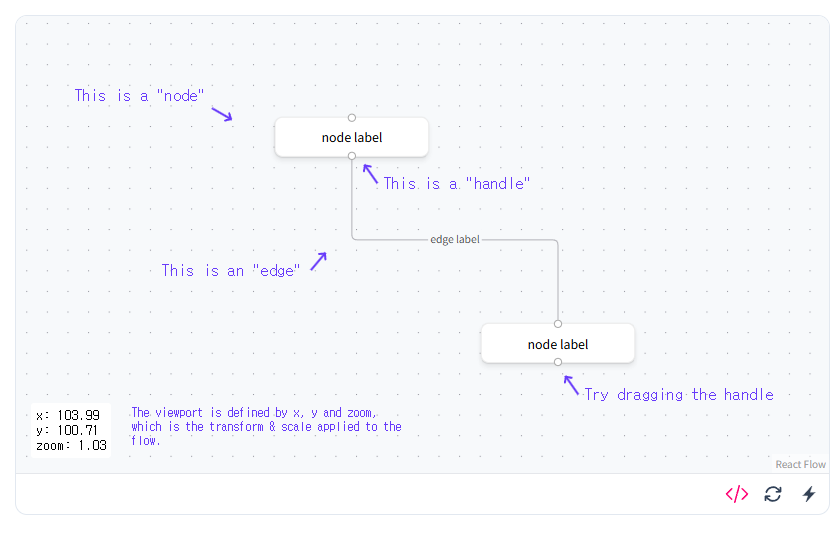
대충 위와 같은 흐름으로 이뤄져 있고, React Flow는 기본적으로 다음 3가지 요소로 구성된다.
개념 1 : Node (노드)
const nodes = [
  {
    id: '1',
    position: { x: 100, y: 100 },
    data: { label: 'Start' },
  }
];
ⓐ. 위치(position)을 가진다.
ⓑ. 내부에 UI를 넣을 수 있다.
ⓒ. 드래그 가능
ⓓ. 커스텀 컴포넌트 가능
즉, 그냥 div가 아니라 움직이는 React 컴포넌트다.
개념 2 : Edge (엣지)
const edges = [
  {
    id: 'e1-2',
    source: '1',
    target: '2',
  }
];
ⓐ. 방향성이 있다. (source -> target)
ⓑ. 화살표 가능
ⓒ. Style Customizing 가능
개념 3 : ReactFlow 컴포넌트
<ReactFlow nodes={nodes} edges={edges} />이게 표현 하는 것
- 노드 렌더링
- 드래그
- 연결
- 줌 / 팬
전부 다 처리 가능
React Flow 내부 동작 흐름
1. 상태로 그래프 정의
const [nodes, setNodes] = useState([]);
const [edges, setEdges] = useState([]);
2. ReactFlow 컴포넌트에 전달
<ReactFlow nodes={nodes} edges={edges} />3. 내부에서 렌더링
nodes -> 화면에 박스로 렌더링
edges -> SVG로 선 그림
4. 사용자 인터랙션 발생
- 노드 그래프
- 노드 연결
- 선택 / 삭제
5. 이벤트 콜백 발생
onNodesChange
onEdgesChange
onConnect
6. 상태 업데이트
setNodes(...)
setEdges(...)
7. 다시 렌더링
즉 정리하자면, 그래프 상태를 React State로 관리하는 엔진
DOM 직접 조작 X
상태 기반 선언형 UI
주요 기능들
import { useState, useCallback } from 'react';
import {
  ReactFlow,
  Controls,
  Background,
  applyNodeChanges,
  applyEdgeChanges,
} from '@xyflow/react';
import '@xyflow/react/dist/style.css';

const initialNodes = [
  {
    id: 'n1',
    data: { label: 'Node 1' },
    position: { x: 0, y: 0 },
    type: 'input',
  },
  {
    id: 'n2',
    data: { label: 'Node 2' },
    position: { x: 100, y: 100 },
  },
];

const initialEdges = [
  { id: 'n1-n2', source: 'n1', target: 'n2', label: 'connects with', type: 'step' },
];

function Flow() {
  const [nodes, setNodes] = useState(initialNodes);
  const [edges, setEdges] = useState(initialEdges);

  const onNodesChange = useCallback(
    (changes) => setNodes((nds) => applyNodeChanges(changes, nds)),
    [],
  );
  const onEdgesChange = useCallback(
    (changes) => setEdges((eds) => applyEdgeChanges(changes, eds)),
    [],
  );

  return (
    <div style={{ height: '100%' }}>
      <ReactFlow
        nodes={nodes}
        edges={edges}
        onNodesChange={onNodesChange}
        onEdgesChange={onEdgesChange}
        fitView
      >
        <Background />
        <Controls />
      </ReactFlow>
    </div>
  );
}

export default Flow;
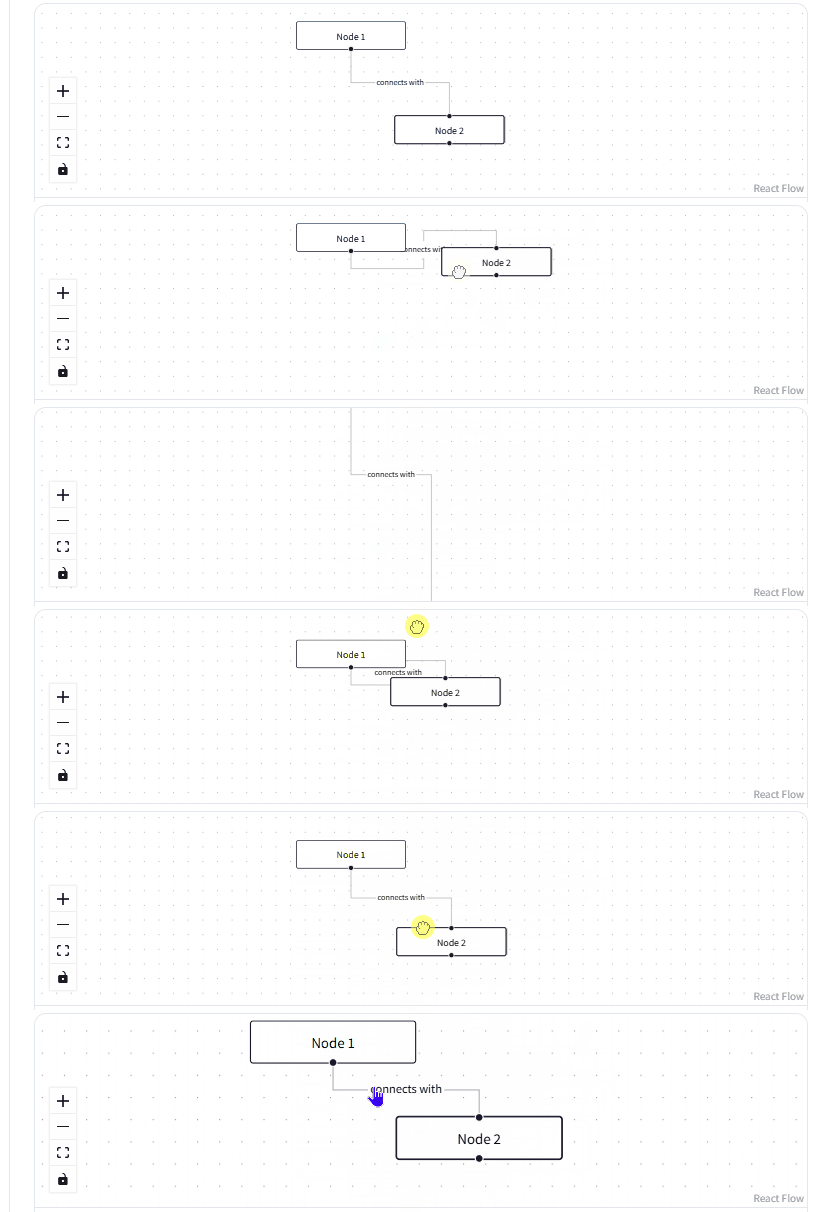
1. 드래그 & 이동 (노드 위치 이동 가능, 자동 상태 변경)
2. 연결 (Connect)
3. 줌 / 팬 (마우스 휠 줌, 캔버스 이동)
4. 커스텀 노드 (완전히 React 컴포넌트 처럼 확장 가능)
5. 미니맵 / 컨트롤 (UX 기능 제공)
<MiniMap />
<Controls />
왜 React Flow를 쓰는가?
1. 복잡한 그래프 UI를 직접 구현할 필요 없음
2. React와 완벽히 통합
3. 확장성이 매우 좋음
정리하자면, React Flow는 "노드와 연결선으로 구성된 그래프 UI를 React State 기반으로 쉽게 구현할 수 있게 해주는 라이브러리"이다.
'정글캠프-WIL > 서브아이템' 카테고리의 다른 글
| 하네스 엔지니어링 - 이해의 폭을 넓히기 위해 (0) | 2026.04.10 |
|---|---|
| xterm.js 라이브러리란? (0) | 2026.04.09 |
| Express.js 프레임워크란? (2) | 2026.04.09 |
| WebSocket과 xterm.js - 프로젝트로 이해 (0) | 2026.04.09 |
| 코덱스의 자동화 기능 (0) | 2026.04.02 |

